Remember wandering through IKEA and imagining yourself living in those perfectly staged rooms? Or strolling past your favourite store and stopping because a mannequin made you picture yourself wearing that outfit? Presentation shapes perception. In the same way, a book mockup helps readers imagine holding the book in their hands, seeing it on their shelf, or tapping it on their e-reader. It turns a flat design into something that feels like a real product.
Types of Free Book Mockups Available
There are many ways to create book mockups. Some tools are built for experienced designers who want full creative control, while others offer simple drag-and-drop editors that generate realistic mockups in just a few clicks. Some are paid, others are totally free.
This guide is for the second group: authors, indie publishers, and marketers who want to create great-looking book mockups without spending hours learning design software. If your goal is to get a professional result quickly and move on to writing, publishing, or promoting your book, these beginner-friendly tools are the best place to start.
Best Free Book Mockup Generators Compared
There are plenty of book mockup tools online, but many hide their best features behind a paywall or add watermarks to the final image. That's why we've focused on tools that are genuinely free, easy for beginners to use, and capable of producing professional-looking book mockups.
Canva
If you're after variety, Canva is hard to beat. They offer hundreds of ready-made mockups that place your book into real-life settings: a novel resting on a coffee table, an ebook displayed on a tablet, or a paperback being held by a reader. These lifestyle-style mockups are are great for promotional images. Just keep in mind that not every mockup is included in Canva's free plan, with many templates requiring a Canva Pro subscription.
That said, Canva's free library can start to feel limiting if you have a very specific aesthetic in mind. If you're looking for genre-specific designs—such as dark romance, fantasy, cozy mystery, or mockups inspired by particular book tropes—marketplaces like Etsy offer a much broader selection. Rather than creating a mockup from scratch, you can purchase designs tailored to your book's style and audience. While Etsy isn't a free option, it's a worthwhile choice if you're looking to invest in more specialised, niche mockups.
DIY Book Covers
If all you need is a clean, realistic 3D book mockup, DIY Book Covers is one of the best options available. Unlike Canva, it doesn't focus on lifestyle scenes. Instead, it generates classic mockups that showcase your book as a paperback, hardcover, ebook, or a combination of formats.
One of our favorite features is the composite mockup, which displays your paperback next to an iPad and iPhone.
The selection is only a handful of standard viewing angles, there are no indication of what the mockup size is (6x9 etc), and the interface also feels a little dated compared to Canva's polished editor. Still, if your priority is creating a professional-looking book mockup without paying a cent, it's hard to complain. Every mockup is yours to download as a transparent PNG or JPG, and there are no watermarks.
ThreeD Mockups
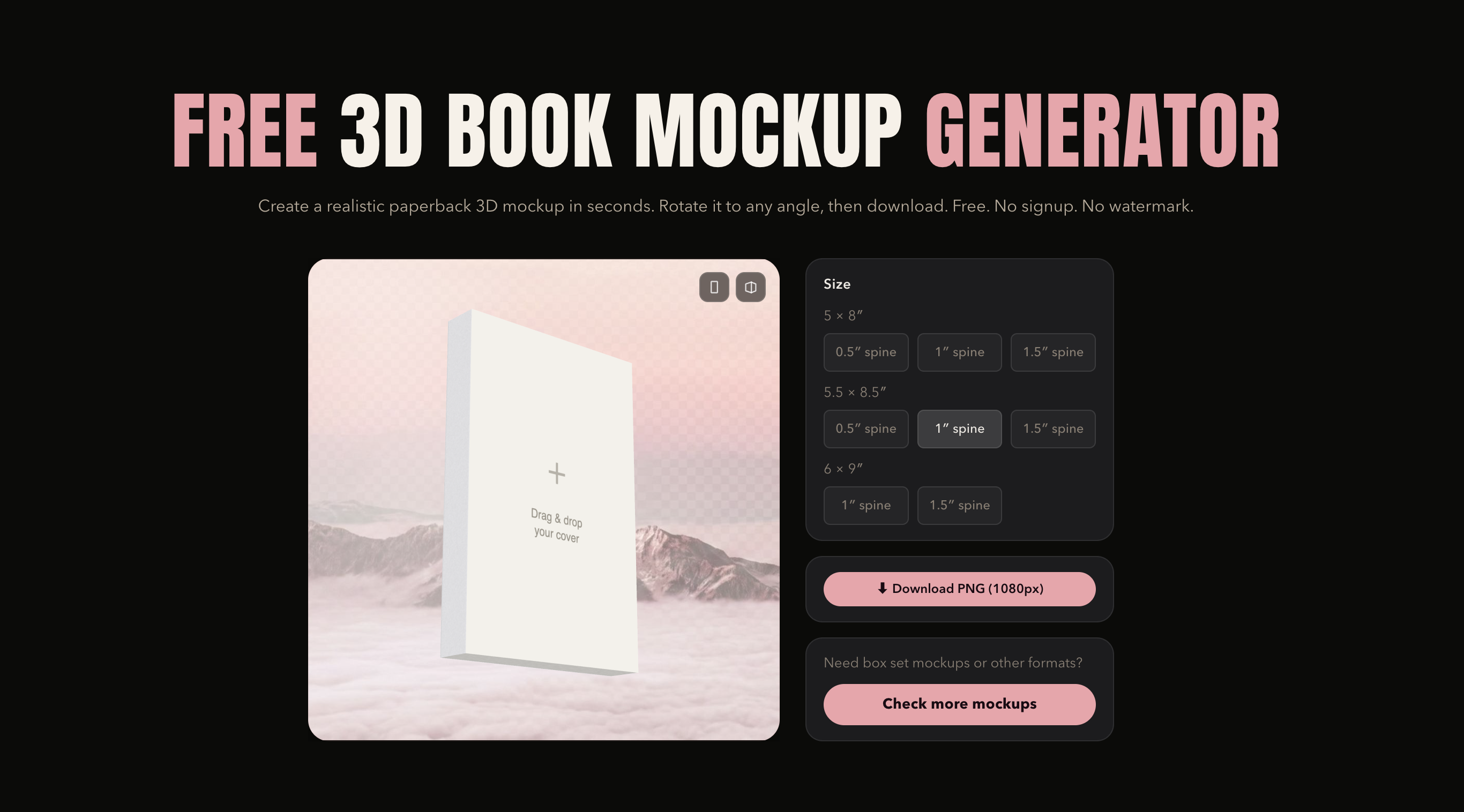
ThreeD is similar to DIY Book Covers in that it focuses on classic 3D product mockups rather than lifestyle scenes. The difference is how much control it gives you. In most cases, you simply upload your front cover (and your spine if the angle requires it), then rotate the book to almost any position until you find the perfect shot.
One feature we really like is the range of book sizes. You can choose from common trim sizes like 5×8, 5.5×8.5, and 6×9, each available in thin, medium, and thick spine widths. If you're trying to match the proportions of your actual printed book, this makes a noticeable difference.
At the moment, ThreeD is limited to softcover or paperback mockups, but it does that job very well. It's completely free to use, and you can download high-resolution transparent PNGs with no watermark. Check out the generator here.
Can I use a free book mockup for commercial purposes?
Usually, yes—but it's always worth checking the licence for the specific tool you're using.
Most free book mockup generators allow you to use the final images in marketing materials, social media posts, online stores, and advertisements. The three tools we've covered above all allow commercial use. If you're using Canva, just make sure your design doesn't include any Pro elements, as those require a paid subscription.
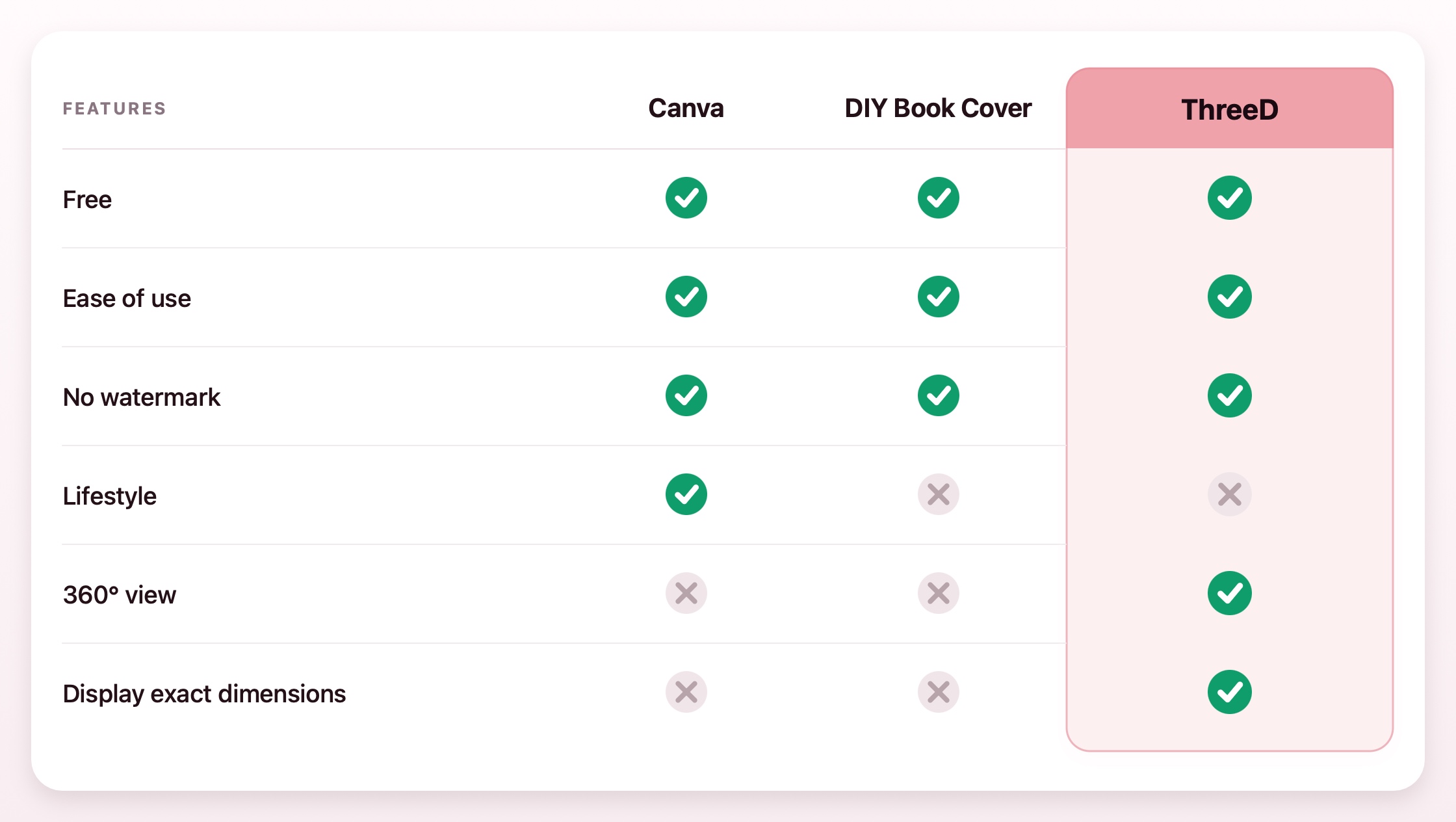
A side-by-side comparison
Here's a quick comparison of the three to help you choose.
Tips for Getting the Best Results From Any Book Mockup Tool
- Start with the highest-resolution cover you have. Even if the tool compresses the final image, a sharp source file produces cleaner text, smoother edges, and a more professional-looking mockup.
- Match your book's size and spine thickness. If the tool lets you choose the trim size or spine width, take advantage of it. A mockup that closely matches your real book always looks more convincing.
- Experiment with a few different tools. Each generator has its own strengths. Canva is great for lifestyle scenes, DIY Book Covers is excellent for quick classic mockups, and ThreeD gives you more control over viewing angles. Try each one and stick with the tool and the workflow that feels easiest for you.